Choosing the wrong cutting technology doesn't just cost you a bad first cut. It affects part tolerance, production throughput, and how much time your team spends fighting the machine instead of running it. A shop that buys a router for structural steel work, or a laser for deep 3D carving, learns that lesson the expensive way.
This article breaks down what actually happened across those 13 machines, not just what the brochures promised. If you're deciding between a CNC router and a laser cutter for your shop, here's what real-world use taught me.
Key Takeaways
- Lasers win on speed, edge quality, and repeatability for flat metal work
- Routers dominate wood, plastics, composites, and jobs needing true 3D depth control
- Bit wear and clamping setup caused more downtime than laser consumable swaps
- Automation-ready fiber lasers let shops scale output without replacing the machine
- Material type and required tolerance should drive your decision, not price alone
TL;DR & Quick Comparison
The core difference: CNC routers use a spinning bit that physically contacts the material. Laser cutters use a focused beam of light and heat with zero contact.
Here's what that difference means on the shop floor:
- Speed and edge quality: Lasers generally win for flat sheet stock, delivering cleaner edges and faster cycle times
- Thick material and 3D work: Routers win when you need depth carving, pocketing, or joinery that a laser simply can't do
- Metal fabrication fit: NEMA- and UL-grade steel enclosure work favors laser, while routers still dominate wood, plastics, and softer metals
- Total cost of ownership: Lasers cost more upfront with fewer consumables, while routers cost less but demand more consumables and labor
Quick Comparison Table
| Factor | CNC Router | Laser Cutter (Fiber) |
|---|---|---|
| Cost | $32,000-$89,000+; driven by bed size and spindle power | $35,000-$200,000+; driven by wattage and automation readiness |
| Cutting Method | Contact-based, bit-driven material removal | Non-contact, heat-based cutting via focused beam |
| Material Fit | Wood, plastics, composites, thinner non-ferrous metals | Sheet steel, stainless, aluminum, other rigid metals |
| Precision & Edges | Limited by bit radius; leaves tool marks needing finishing | Tight kerf, clean edges suited to repeatable, spec-driven parts |
| Maintenance | Bit wear, chip management, clamping setup add labor time | Fewer moving parts, fewer consumables, less unplanned downtime |
What is a CNC Router?
A CNC router is a contact-based subtractive tool. A spinning bit follows CAD/CAM-generated toolpaths to carve, cut, or shape material, whether that's a sheet of plywood or a block of acrylic.
Why fabricators still use them:
- Versatility across wood, plastic, composite, and softer metal stock
- True 3D depth control for pockets, joinery, and carved detail
- Repeatability down to roughly 1/1000 in. on well-built industrial units, according to MultiCam's published router specifications
These strengths translate differently depending on shop size. Most shops run one of three configurations: gantry-style desktop routers for smaller shops, larger industrial multi-axis units for production floors, and router/laser hybrid machines that try to split the difference.
Use Cases of CNC Routers
Routers earn their keep in prototyping, signage, aluminum composite panel work, and non-structural fixtures. Cabinetry and architectural millwork shops rely on them daily. So do plastic and acrylic fabricators who need clean, precise cuts without melting the edge.
Beyond these applications, routers hold one clear edge over lasers: thick material depth. A router can pass through multiple inches of MDF, plywood, or plastic in stages that a laser physically can't manage on the same stock. Tooling catalogs list depth-per-pass limits around 1/8 in. for certain spoilboard cutters, but the router keeps working pass after pass where a laser would hit a thickness limit.
What is Laser Cutting?
Laser cutting is a non-contact thermal process. A focused beam, either fiber or CO2, melts or vaporizes material along a programmed path while an assist gas clears the melt from the kerf.
What this means operationally:
- Faster cycle times on flat stock, especially thinner gauges
- Minimal material waste thanks to a thin kerf width
- Consistent, repeatable results for spec-driven parts that need to match every time
CO2 lasers handle organics and acrylics well. Fiber lasers are built specifically for reflective metals, cutting steel, aluminum, and stainless far more efficiently than CO2 lasers can match.
Use Cases of Laser Cutting
In metal fabrication, laser cutting shows up in sheet metal blanking, structural steel components, and enclosure fabrication that needs to hit NEMA or UL compliance targets. Trailer OEMs, switchgear and electrical enclosure builders, and structural steel fabricators lean on lasers for exactly this reason.
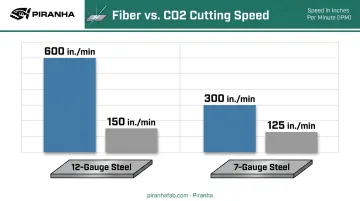
The speed difference is real. Felling Trailers added a 6,000-watt fiber laser and reported roughly 600 in./min on 12-gauge steel, compared to about 150 in./min with their previous CO2 laser. On 7-gauge material, the gap held: roughly 300 in./min versus 125.
Speed isn't the only factor worth planning around. Fiber lasers built with automation in mind, like Piranha's Flex Series, let shops add material loading and unloading later without replacing the whole machine. That matters when production volume creeps up faster than expected.
CNC Router vs Laser: Which Is Better for Metal Fabrication?
The honest answer: it depends on four things.
| Decision Factor | Favors Router | Favors Laser |
|---|---|---|
| Material type & thickness | Wood, plastic, soft non-ferrous stock | Steel, stainless, aluminum plate |
| Required tolerance | Looser tolerances, artistic work | Tight, repeatable spec-driven parts |
| Production volume | Low-volume, custom one-offs | High-volume, flat-part runs |
| Engraving vs. structural cutting | 3D depth work, engraving | Flat structural cuts |
Quick rule: Choose a CNC router for wood, plastics, or softer non-ferrous material where you need 3D depth. Choose a fiber laser for steel, stainless, or aluminum sheet and plate work where speed and repeatable precision matter more than carving depth.
Real-World Lessons: What 13 Machines Taught Me
Spec sheets tell you what a machine can do. Running one for a year tells you what it actually does. Here's what stood out across the shops I worked with.
Material limits show up fast. Routers hit a hard wall on hardened or thick ferrous metal, no matter how good the bit. Lasers, meanwhile, struggle with highly reflective material or plate beyond their rated wattage. Neither machine bluffs its way past physics.
Downtime patterns differ. Router bit wear and clamping setup created more unplanned stoppages across the shops I reviewed than laser consumable changes did. Collets on routers have a typical service life of roughly three months at eight hours daily use.
Fiber lasers have their own wear items, but they don't demand the constant re-clamping routers do between parts. Common laser consumables include:
- Cutting optics
- Cover slides
- Nozzles
- Ceramic insulators
Precision requirements make the decision for you. Shops producing NEMA- or UL-relevant enclosures need repeatable hole positioning and clean edges. A laser delivers that consistently, part after part. A router can get close, but tool marks usually mean a finishing step the laser skips entirely.
Total cost of ownership isn't just sticker price. Bit replacement adds up in labor and material cost over time. Laser consumables cost more per swap but happen less often, and the components sit outside standard warranty coverage precisely because their lifespan depends on how hard you run them.
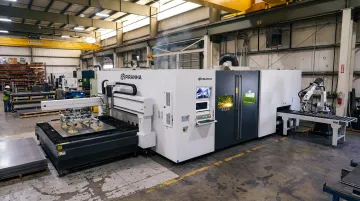
Scalability separates the shops that plan ahead from the ones that don't. Shops that invested in automation-ready fiber lasers, like Piranha's Flex Series ranging from 3kW to 20kW, avoided replacing equipment as volume grew. Router-only shops chasing higher metal throughput often outgrew their machines within a few years.
If you're cutting primarily metal, this is the moment to evaluate whether a fiber laser platform fits where your production is headed, not just where it is today.
Conclusion
There's no universal winner here. The right choice depends on your material, thickness range, tolerance requirements, and how much you plan to scale. Both technologies earn their place depending on the job mix running through your shop.
What matters is connecting the decision to outcomes you actually care about: less downtime, faster return on investment, and parts that come out consistent every time. Get that right, and the "winner" label becomes irrelevant. The right choice is whichever machine matches the job in front of you.
Frequently Asked Questions
Which is better, a CNC router or a laser cutter?
It depends on material and job type. Lasers suit precise, repeatable metal cutting, while routers suit thicker, non-metal, or 3D carving work. Neither is universally better.
Can you engrave with a CNC router?
Yes, using V-bits or ball-nose bits. Results take longer and show less detail than laser engraving, but routers handle it fine for signage and decorative work.
Does laser cutting count as CNC?
Yes. Laser cutters follow computer-programmed toolpaths just like routers do, making them a type of CNC machine, even though "CNC" often colloquially means routers.
Can a CNC router cut metal?
Routers can cut soft non-ferrous metals like aluminum with the right bit. They aren't suited for structural steel or thick plate.
How much does a laser cutter cost compared to a CNC router?
Entry-level machines land in similar price ranges. Industrial fiber lasers carry a higher upfront cost, generally offset by lower long-term operating expenses.
What thickness of metal can a fiber laser cut?
Cutting capacity scales with wattage. According to GWK Laser's fiber cutting guide, 6kW systems handle up to 25mm carbon steel, though capacity varies by machine. Talk to Piranha's specialists to match wattage to your needs.